
- Zľavy a propagačné akcie
- Počítače a notebooky
- Telefóny a tablety
- Elektronika
 Kancelárske vybavenie
- Ergonómia
- Interaktívne displeje
- Kancelárske potreby
- Skartovačky
- Rezačky papiera
- Laminátory
- Viazacie stroje
- Tabule
- Projekčné plátna
- Vitríny
- Flipcharty
- Svietidlá
- Kalkulačky
- Pečiatky
- Prezentéry
- Priečinky na dokumenty
- Závesné vrecká a euroobal
- Kancelárske príslušenstvo
- Kancelárske stoličky
- Zdravotná obuv
- Školské potreby
- LIKVIDÁCIA SKLADU
 Káble a redukcie
- USB
- Audio-Video
- Anténne
- Cestovné adaptéry
- Dátové a paralelné
- DisplayPort
- DVI
- Firewire
- Flexo káble
- HDMI
- Koaxiálny kábel
- Káble pre iPhone/iPad
- Konektory - audio, video, TV
- Metráž na pripojenie reproduktorov
- Napájanie 230 V do PC
- Organizátory káblov
- Predlžovacie káble a prívody 230 V
- Prepäťové ochrany
- Konvertory, rozbočovače, prepínače, rozdeľovače
- PS/2
- Redukcie
- Serial ATA (SATA)
- Sériové
- Sieť (LAN, RJ-45, Patch, 305m, 500m, box)
- Špeciálne predlžovacie káble - PowerCube
- Tester káblov
- VGA (D-SUB)
- Zásuvkové lišty a moduly
 Auto - moto
- Nosiče bicyklov do auta
- USB nabíjačky do auta
- Kamery do auta
- Autorádiá
- Diagnostika automobilov
- Nabíjačky autobatérií
- Autochladničky
- Alkoholové testery
- Vysielače FM
- Autokozmetika
- Antiradar
- Meniče napätia
- Svorky a popruhy
- Škrabky a lopaty
- Parkovacie senzory
- Vôňa do auta
- Výmena pneumatík
- Pohodlné vybavenie
- Navigácia GPS
- Gaming
- Veľké spotrebiče
- Domácnosť
 Malé spotrebiče
- Kávovary a espresso
- Rýchlovarné kanvice
- Kuchynské roboty
- Mixéry a šľahače
- Mikrovlnné rúry
- Minirúry
- Domáce pekárne
- Elektrické grily
- Hriankovače
- Hriankovače
- Vaflovače
- Fritézy
- Ryžovary
- Multifunkčné hrnce
- Sous vide
- Sporáky s varnou doskou
- Odšťavovače a lisy
- Elektrické mlynčeky na mäso
- Krájače potravín
- Krájače a strúhadlá
- Sušičky ovocia
- Vakuovačky
- Autochladničky
- Vychytávky do kuchyne
- Vysávače
- Parné čističe
- Žehličky
- Úprava vzduchu
 Krása a zdravie
- Starostlivosť o pleť
- Starostlivosť o telo
- Starostlivosť o vlasy
- Zubná starostlivosť
- Starostlivosť o ruky
- Starostlivosť o nohy
- Holenie a depilácia
- Dezodoranty a antiperspiranty
- Kozmetika pre mužov
- Parfumy
- Okuliare
- Masáž a relaxácia
- Zdravotné pomôcky
- Ultrazvukové čističky
- Zdravotná obuv
- Osobné váhy
- Športová výživa
- Vitamíny a výživové doplnky
- Zdravá výživa
- Dielňa a záhrada
 Auto-moto
- Nosiče bicyklov
- Autostany
- Markízy pre auto
- USB nabíjačky do auta
- Kamery do auta
- Autorádiá
- Diagnostika automobilov
- Nabíjačky autobatérií
- Nabíjačky elektrických vozidiel
- Autochladničky
- Alkoholové testery
- Vysielače FM
- Autokozmetika
- Organizátori automobilov
- Antiradar
- Meniče napätia
- Svorky a popruhy
- Chrániče čelného skla
- Škrabky a lopaty
- Parkovacie senzory
- Vône do auta
- Výmena pneumatík
- Pohodlné vybavenie
- Navigácia GPS
 Záhradná technika
- Akumulátorové nožnice
- Čerpadlá
- Drviče a štiepkovače
- Infračervené ohrievače, topiče
- Krovinorezy
- Kultivátory
- Pasce na hmyz
- Lisy na ovocie
- Odstraňovače buriny
- Zastrihávače plotov
- Postrekovače
- Príslušenstvo
- Ručné zametacie stroje
- Reťazové píly
- Zberače lístia
- Kosačky na trávu
- Vertikutátory - prevzdušňovače trávnika
- Vysávače na lístie
- Vysokotlakové čističe
- Záhradné fúkače lístia
- Záhradné vozíky
- Zemné vrtáky
- Cyklo a šport
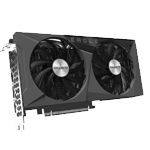














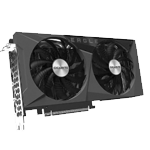






















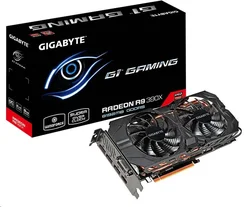
Poradňa k produktu GIGABYTE GV-R939XG1 GAMING-8GD
Objednávací kód: 9303785,Part No.: GV-R939XG1 GAMING-8GD,Záruka spotrebiteľ/ostatní: 36 mesiacov / 36 mesiacov
shuyin200 |7. 7. 2015
For those running into “black screen” The issue is caused by windows identifying the card as R9 200 series. The card is not compatible with that so it locks out. To fix the issue boot into safe mode. Put the CD that came with the card in the optical drive. Go to Device Manager -> Display adapters -> R9 200 series. Right-click the R9 Series listed under the display adapters and select 'Update Driver Software'. Choose Browse my computer for driver software and point it to the CD.
Ak máte akúkoľvek otázku ohľadom produktu alebo jeho použitia, neváhajte sa nás opýtať. Náš tím skúsených profesionálov sa na Vašu otázku čo najskôr pozrie a pokúsi sa odpovedať čo najlepšie.
Otázky zodpovie
Radim (T.S.BOHEMIA)